
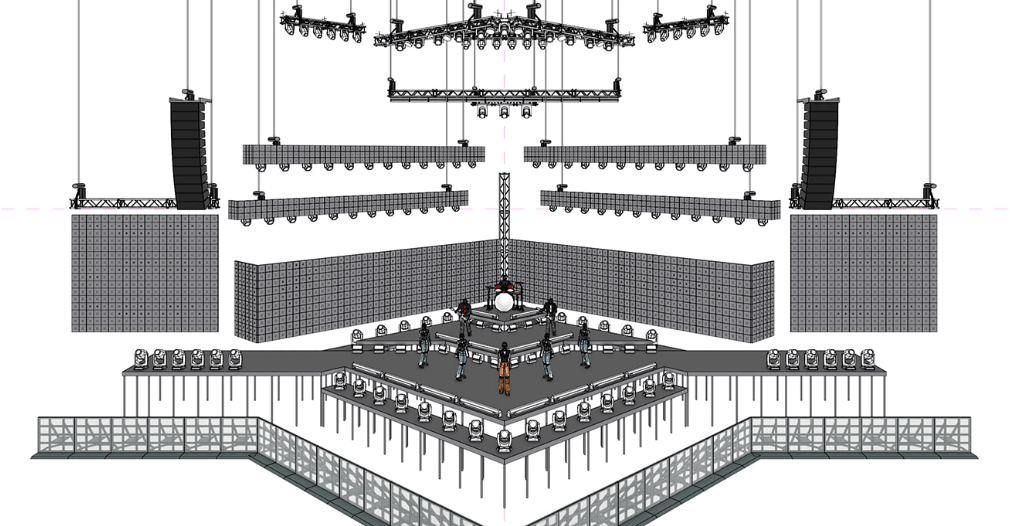
Search “Vectorworks course” and you get two kinds of pages. Software marketing pages that promise an “industry-standard BIM workflow.” And institute pages that promise the same thing in different words, without ever showing you what a training session actually looks like.
Neither answers the question a prospective student actually has: what am I doing with my hands for 48 hours?
This post answers that directly. It walks through IIED’s real Vectorworks Spotlight curriculum, phase by phase — the same module breakdown our mentors teach from, not a marketing summary of it. By the end, you should be able to picture yourself in the room: what you open first, what you build by week two, and what you walk out with.
Table of Contents
Why “Hands-On” Matters More Than the Software Name
If you already did an event management course, you have probably heard “learn CAD” or “learn Vectorworks” as vague advice — a line on a syllabus, not a skill you actually built. That gap is exactly why event management graduates struggle to get hired for technical, production-facing roles. You can plan an event. You cannot yet produce a drawing a vendor or venue will accept.
Vectorworks Spotlight is the software event production professionals actually use to document a show: floor plans, rigging plots, lighting plots, seating layouts, stage elevations. It runs on a Building Information Modeling (BIM) workflow, which means every element — a truss, a seating block, a lighting fixture — carries real data, not just lines on a page. Vectorworks’ own product page for Spotlight is a useful reference if you want to see the software’s full feature set before you commit to learning it.
Software marketing pages will tell you what the tool can do. What they will not tell you is what a real training session feels like — whether you are watching a demo or actually building something. At IIED, you build something. Every phase of the course ends in a real deliverable, not a slide.
Inside the 48-Hour Vectorworks Spotlight Curriculum
IIED’s Vectorworks Spotlight for Event Production course runs 48 total hours — 24 hours of live, instructor-led training and 24 hours of self-paced practice, working through the same real professional software our mentors use on live projects. The curriculum moves through three levels: Basic, Intermediate, and Advanced. Here is what each one actually covers.
Basic Level — Getting Comfortable Inside Vectorworks Spotlight
The first phase is not a theory lecture. You open the software and learn to move inside it the way a working designer does.
- Interface navigation and workspace customisation — setting up your workspace the way a professional would for event documentation work, not the default template.
- Document setup and file organisation — the unglamorous habit that separates a drawing a venue will accept from one that gets sent back.
- Importing base plans — pulling in venue layouts from PDF, DWG, or SketchUp files, which is how almost every real event project actually starts. You are rarely drawing a venue from scratch; you are importing what a venue or client already gave you and building on top of it.
- Graphic attributes and palette usage — controlling how your drawing reads, so a floor plan is legible to a vendor, not just to you.
By the end of the Basic level, you can open a real venue plan, set it up correctly, and start placing elements on it with precision.
Intermediate Level — Building Real Venue Elements
This is where the “Spotlight” part of Vectorworks Spotlight comes in — the toolset built specifically for entertainment and event design, not general architecture.
- Layers and Classes, Viewports management — organising a complex drawing so different teams (lighting, sound, decor) can each see only what they need.
- Spotlight resource browser — the library of pre-built entertainment-industry objects: fixtures, trusses, staging, that you drop into a drawing instead of building from zero every time.
- Design elements: stage decks, seating sections, soft goods — the actual building blocks of a wedding mandap layout, a corporate stage, or a concert seating plan.
- 3D extrusions and solids for realistic venue modelling — turning a flat 2D layout into a 3D model a client can actually visualise before a single truss goes up.
By this stage, you are not copying a demo. You are laying out a stage deck configuration or a seating section the way it would need to look for a real client walkthrough.
Advanced Level — Rigging, Data, and Professional Drawings
The final phase is where the course earns the word “technical.”
- Rigging: Truss, Mother Grids, Bridles — the structural rigging systems that hold lighting, sound, and video rigs safely in the air. This is not decorative drawing; it is documentation that a rigging crew will actually build from.
- Lighting devices, audio/video equipment placement — placing real equipment in a real plot, coordinated with the lighting and production teams the way it happens on an actual show.
- Data management using Worksheets — generating reports and inventory lists straight from your drawing, so a production manager can order the right quantity of every fixture without recounting by hand.
- Custom scaffolding systems — building non-standard structural elements a template will not already have.
- Professional stage technical drawings with Title Blocks, Drawing Labels, Dimensions — the finishing layer that turns a drawing into a document a venue, vendor, or production company can actually sign off on and build from.
This is the phase that separates a student who “used Vectorworks in a course” from one who can hand a venue a drawing they trust.
What a Real Training Session Actually Looks Like
Picture a Basic-level session in week one. You are not watching a slide about “the importance of BIM workflows.” You have a venue base plan open — a real PDF or DWG a client or venue handed over — and you are importing it, setting your layers, and getting your workspace organised the way a working designer would before touching a single drawing tool. The instructor is walking the room, not talking at a screen.
By the Intermediate sessions, the room changes. You are pulling pieces from the Spotlight resource browser — a stage deck here, a seating block there — and laying out a floor plan the way you would for an actual wedding mandap or a corporate stage. Someone next to you is building the same layout in 3D, turning a flat plan into a model a client could actually walk through before a single truss goes up.
By the Advanced sessions, the work gets technical in a way that matters on a real job site. You are placing rigging — truss runs, mother grids, bridles — the way a rigging crew would need to see it on paper, not just how it looks on screen. You generate a Worksheet report straight from your own drawing and watch it produce an inventory list a production manager could actually order from. You finish a drawing with proper title blocks and dimensioning, the layer that turns your file from “something you made” into “something a venue will sign off on.”
That is the difference between a course that shows you software and one that trains you to document a real event. It is also why the selection process exists — every one of those 24 live hours only works if the room is small enough for the instructor to actually catch a mistake in your rigging plot before it becomes a habit.
Who This Course Is Actually For
IIED’s Vectorworks Spotlight course is deliberately narrow. It is not a general introduction for anyone curious about design software. It is built for two kinds of people.
The event management graduate who cannot get hired for technical roles. If you have a BEM or a private event management diploma, you already know planning and coordination. What you do not have is a way to produce a drawing that a venue, vendor, or production company will accept. That gap is exactly why technical and production roles keep going to people with software training you were never taught. Vectorworks Spotlight is one of three courses IIED specifically recommends to close it.
The working professional who needs a credible technical upgrade. If you already work in events, hospitality, interior design, or architecture, you do not need to start over. You need a focused, real skill that fits around a job and adds documentation ability to whatever you already do.
Both groups ask the same honest question before they commit: is this lecture-based, or will I actually be building something? The 48-hour structure above is the answer — 24 hours are live and instructor-led, and the rest is supervised practice on the same software, not homework you figure out alone.
Selection, Deliverables, and the 100% Internship
This is not an open-enrolment course. Getting in requires a 4-phase selection process: application, entrance exam, interview, and final selection. That is intentional. Small batches mean every seat is a real seat, with real instructor time — not a lecture hall of a hundred people learning software from a screen recording.
What you walk away with is not a certificate you file away. It is a working knowledge of real deliverables: imported and annotated venue base plans, 3D venue models, rigging plots built with Truss, Mother Grid, and Bridle systems, Worksheet-generated inventory reports, and finished technical drawings with proper title blocks and dimensioning — the same categories of document a production company actually asks for.
And on completion, every student gets a 100% 3-Month Non-Paid Internship — a structured, included next step into real production work, not a certificate and a goodbye. This is IIED’s strongest documented proof point for this exact course, because it answers the question every student actually has after finishing training: what happens next? For the full detail on how the internship works, see our honest guide to the Vectorworks internship program.
We can show you what that pathway leads to with a real, adjacent example. Aron Sagar completed IIED’s CAD for Events & Entertainment course — the same Event Production vertical as Vectorworks Spotlight — and now works in the Operations & Production department at NMACC, the Nita Mukesh Ambani Cultural Centre in BKC, Mumbai. To be clear: this is a CAD-course placement, not a Vectorworks-specific one. We are using it as adjacent proof of what happens when IIED’s hands-on technical software training in this vertical meets a serious venue — not as a claim about where every Vectorworks graduate lands.
The same pattern holds institute-wide. Pranay Mhatre trained on IIED’s Event & Wedding Design course, not Vectorworks specifically, and is now a Production Designer at WIZCRAFT International Entertainment — India’s oldest and largest event company. It is not a Vectorworks-specific outcome either. We flag it clearly for the same reason: technical, hands-on training at IIED converts into real jobs at real companies, across every vertical we teach.
CAD, Vectorworks, or Both? Where This Fits Among IIED’s Event Production Courses
If you already know AutoCAD or are weighing it against Vectorworks, you are not alone — it is one of the most common questions we get before enrolment. The short answer: AutoCAD teaches you precision drafting fundamentals across any industry. Vectorworks Spotlight is built specifically for entertainment and event documentation, with a resource library of trusses, fixtures, and staging you would otherwise have to build from scratch in general CAD software. We cover the full comparison, including which one to learn first if you are starting from zero, in our CAD vs Vectorworks for Event Production guide.
It is also worth being honest about how rare this training is in India right now. None of the major event and lighting institutes — NAEMD, NIEM, EMDI, Mseed, Cameo Light Academy, or KAAL — teach Vectorworks at all. That is not a coincidence; it is a real gap in the market. If you want the broader case for why this software is worth learning at all before committing to a 48-hour workshop, start with our overview post, Vectorworks For Event Design In India.
This gap matters because of the size of the market it sits inside. India’s wedding industry alone is worth roughly ₹3.75 lakh crore and growing, and that is before counting corporate events, concerts, and award shows that all need the same category of technical documentation. Every one of those events needs someone who can turn a concept into a drawing a vendor can build from. Right now, very few people in India can do that on real software, in a real workflow, at a professional standard.
Ready to See What You’d Actually Be Building?
Reading a module breakdown only tells you so much. The fastest way to know if this course is right for you is to sit down with us and talk through where you are now and what a technical role in event production would actually require.
Book your free visit at IIED’s Malad East studio and see the Vectorworks setup for yourself. Call 9892966334 to check the next Vectorworks Spotlight batch and start the 4-phase selection process.